Clients book themselves: how UzmiTermin works
UzmiTermin is an online booking service for independent professionals, specialists and small salons in Serbia. Instead of messaging back and forth, you get your own booking page: clients see free slots and book on their own, and every visit lands in one calendar.

If you work in services - you cut hair, treat patients, clean homes, teach or fix cars - you have probably had this conversation:
Hi, do you have anything on Thursday?
Yes, at 11 or at 4 pm.
Anything later?
No, nothing later. Friday works.
I can't do Friday…
Five messages for a single booking - and the same again with every client. You need to reply fast or the client goes elsewhere, but your hands are busy with work. Bookings are scattered across Viber, Instagram, WhatsApp and a notebook, and it's easy to put two clients in the same slot.
UzmiTermin takes this back-and-forth out of your work. Here's how the service works for you and for your clients.
A personal calendar clients book into themselves
You describe your work once: which services you offer, how long each takes and when you work. UzmiTermin turns that into a booking page with a short address, for example app.uzmitermin.rs/milica-nails.
The client opens the link, sees only free slots and books on their own. You stay in control: every booking lands in your calendar, and you can confirm, move or cancel any of them.
Setup: a few minutes, once
-
Sign up. About a minute, no card needed. Your short page address is reserved for you right away.
-
Services and how long they take. For example "Consultation - 45 min" or "Gel manicure - 1.5 h". Based on duration, the system works out free slots and prevents overlaps.
-
Working hours. Days, hours, breaks and days off. Nobody can book a time that isn't open.
-
Link and QR code. Put the link in your Instagram bio, your Viber status or auto-reply, or send it in a chat. Print the QR code for your front desk, office or business cards.
Start with a free trial - no card required.
How a client books
The client taps the link or scans the QR code and lands straight on your booking page. No app to install, no account to create - the page opens in a regular browser.
Booking takes three steps:
- pick a service;
- pick a free slot;
- enter a name and phone number.
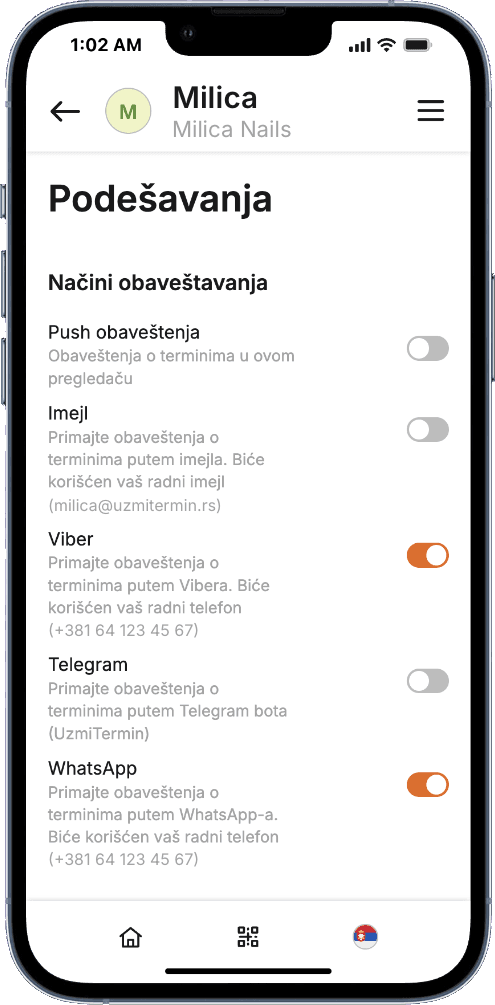
The client gets a confirmation, and you get a notification about the new booking - in Viber, WhatsApp, Telegram, as a push notification or by email.
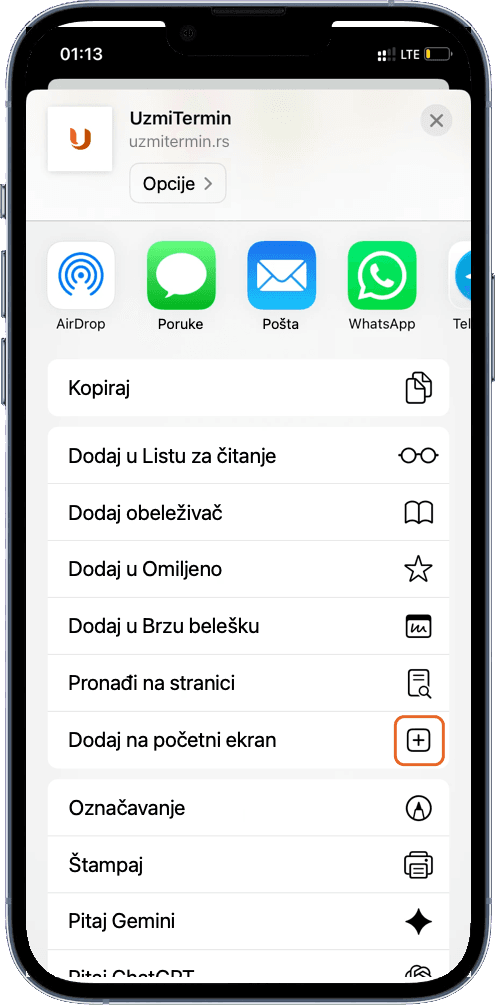
The page can be added to the phone's home screen and works like an app - with its own icon, but without the App Store or Google Play. This format is called a PWA (progressive web app). Your own dashboard works the same way.
What happens after a booking
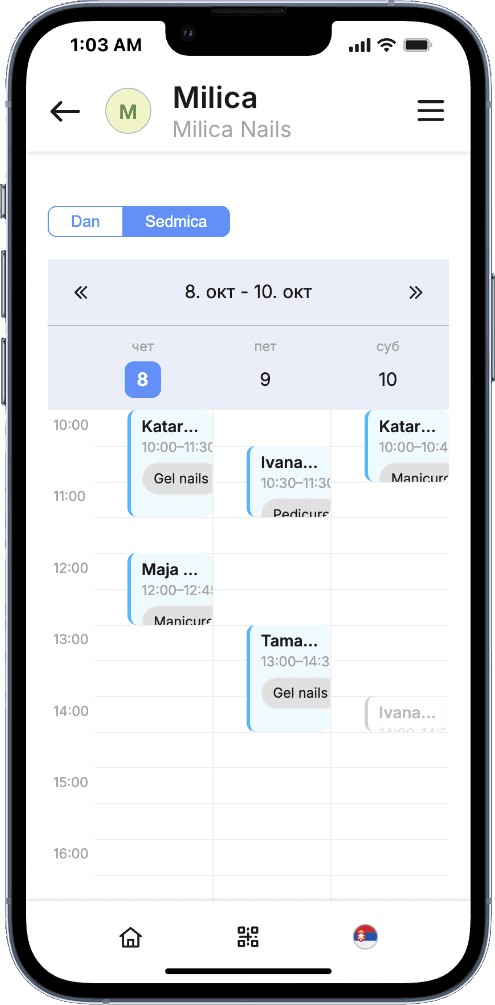
The booking shows up in your calendar instantly. From the notification you can confirm it, decline it or suggest another time in a couple of taps.
Clients manage their bookings too: with the button in their message they can cancel or ask to reschedule - no later than two hours before the start, so a slot doesn't free up at the last minute.
Manual booking vs UzmiTermin
| Manually | UzmiTermin | |
|---|---|---|
| Free slots | The client asks and waits for a reply | The client sees them on your page |
| Your time | Several messages per booking | Clients book without you |
| Double bookings | Easy to slip up checking chats and a notebook | Impossible: taken slots are unavailable |
| Cancelling and rescheduling | Calls and messages | A button in the message |
| Reminders | Message everyone yourself | Sent automatically the day before |
| Where bookings live | A notebook and several messengers | One calendar |
For one specialist or a team
UzmiTermin works for self-employed professionals as well as small salons, clinics and studios. In a team each specialist has their own schedule and services, while the administrator sees the shared calendar. Clients can pick a specific specialist - and that person gets the notification.
How UzmiTermin differs from marketplaces
A marketplace brings new clients, but every time a client comes back it shows them dozens of competitors and their discounts again. UzmiTermin helps you keep your regular clients:
- Clients come straight back to you. Your link stays in their chats, on Instagram or on their home screen.
- Visit reminders. Clients get a reminder the day before - fewer forgotten visits and empty slots.
- Your page shows only you. No neighbouring salons, no competitors' deals.
- No commission. We don't take a cut of bookings.
- Your client base is yours. We never message your clients or share their contacts. Export your base at any time.
Subscription: all of this at full power
A subscription unlocks everything UzmiTermin can do:
- Notifications where you actually read them - Viber, WhatsApp, Telegram or push.
- Clients always in the loop - confirmations, changes and reminders reach them in their messenger.
- Cancelling and rescheduling without calls - clients do it themselves.
- Teamwork - the "We work as a team" plan for salons and clinics with 3-5 specialists.
- QR code stickers for your workplace - clients book their next visit before they leave.
A month of subscription costs less than one missed visit or a lost regular client. The plans are "I work solo" and "We work as a team" - see prices on the Pricing page.
Try it free for 21 days
Start a 21-day free trial, create your page and book an appointment on it from your own phone. You'll see right away what booking looks like for a client and how notifications arrive.
Start with a free trial - no card required.