Booking right on your website: how the UzmiTermin widget works
An online booking calendar on your salon or clinic website in five minutes: one line of code, colors that match your design, booking without leaving the page. Here is how to embed the widget and what it does for your business.
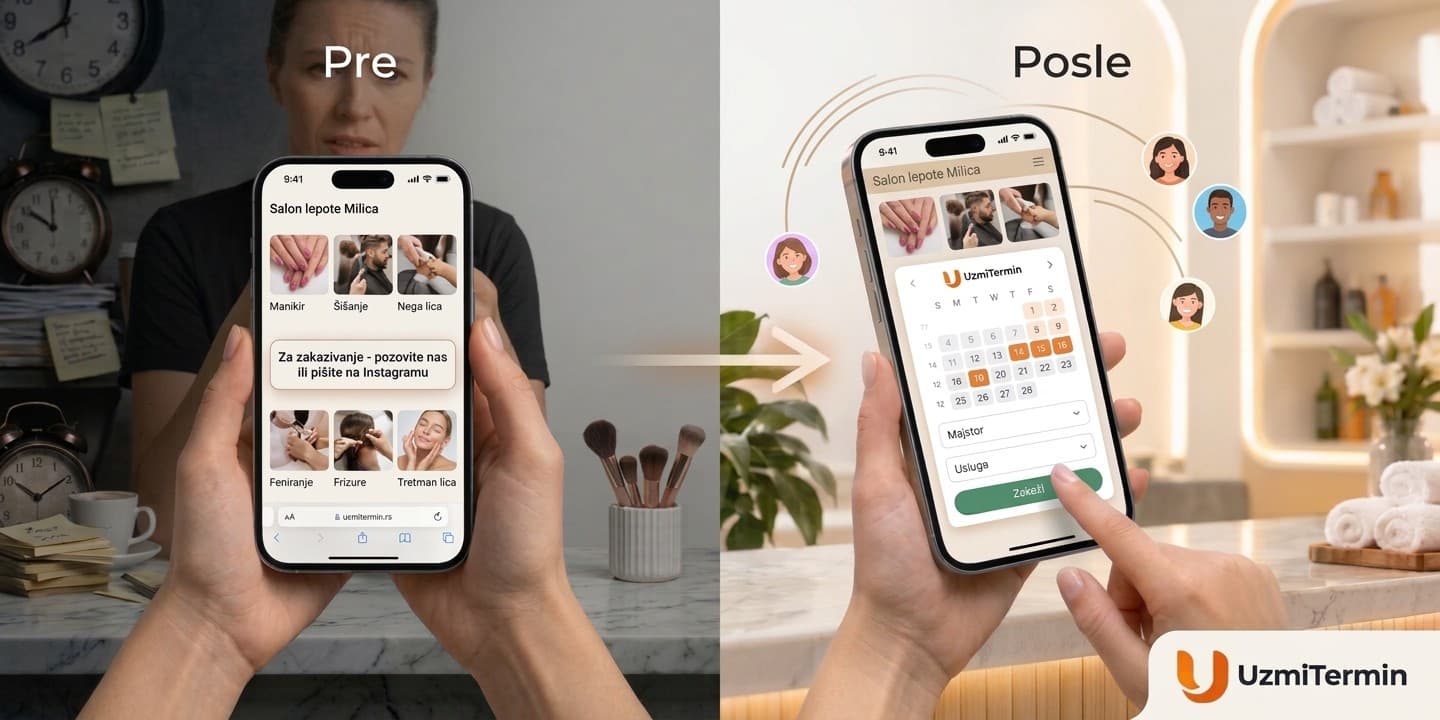
Someone found your website, looked at photos of your work and your prices - and decided to book. Then they see "Call us" or a link that takes them to another page. Calling is inconvenient: they are at work, it is late, or they simply do not like phone calls. They close the tab "until tonight" - and most likely never come back.
Your website did its job: it convinced the client. But the booking never happened. The UzmiTermin booking widget closes that gap: a calendar with free time slots sits right on the page, and the client books where they made the decision.
What the booking widget is
It is the UzmiTermin calendar embedded in your website. The client sees your specialists, services and free time slots, picks what suits them and books - without leaving the page and without installing any app.
The booking appears in your UzmiTermin calendar right away - next to bookings from Instagram, Viber and phone calls. The client gets a confirmation and a reminder, just like with regular online booking. There is nothing extra to manage: the widget is just one more door into the same calendar.
One line of code to embed
You do not need a developer. If your website lets you add an HTML block - and WordPress, Tilda, Wix and almost every site builder do - you can do it yourself.
-
In the Booking widget section, enter your website's domain, for example
salon.rs. -
Copy the code that appears after you save.
-
Paste it on the page where the calendar should be. Done.
The whole code is one line:
<script src="https://widget.uzmitermin.rs/e/YOUR_TOKEN.js" async></script>
The widget adapts to the page on its own. It takes the width of its block and adjusts its height to the content, so there is no extra scrolling inside, and it looks just as good on a computer as on a phone. When the client picks a time, the booking window opens over the page. After booking they stay where they were and can keep browsing your site.
If your website is built with React or Next.js, the guide has a ready-made component - your developer only needs to put it in the right place.
Looks like part of your website
A third-party widget in mismatched colors immediately looks "bolted on" and makes people wary. That is why the widget's look is set up to match your website - without a single line of CSS.
- Primary color. Buttons, the selected specialist and service, today's date. Enter your brand color - and the widget will pick the button text color, white or dark, by itself so labels stay readable.
- Background. Any color or transparent - then your page shows through the widget, as if the calendar were drawn right on it.
- Calendar headers. A separate color for the row with the date and the days of the week.
- Language. Serbian, English or Russian. By default the widget speaks the language of your page, and if that cannot be detected - the language of the client's browser.
All of this is set up in the Booking widget section, and the preview immediately shows how the calendar will look on your site. You do not need to change the code: the widget takes its look from the settings.
For those who need more, there are settings right in the code. For example, the English version of your site can show the widget in English, and a specialist's page can open their calendar straight away. This way one widget works differently on different pages.
See the widget demoWhat the widget does for your business
Fewer lost clients. Every extra step between "I want to" and "I booked" loses some people: a phone call, a jump to another site, waiting for a reply in a messenger. With the widget there are almost no steps left - the client picks a time right where they read about you.
Booking around the clock. Your website works while you sleep, cut hair or see a patient. On a Sunday evening a client sees a free slot for Tuesday and books it - without you lifting a finger.
Fewer messages and calls. Questions like "Is Saturday possible?" and "How long does the treatment take?" go away: free time slots and service durations are visible right away. Your receptionist has more time for the clients who are already there.
Everything in one calendar. Bookings from your website, Instagram, Viber and phone calls land in the same calendar. No double bookings: if a slot is taken, the client simply will not see it on your site.
You can see how many bookings your website brings. The widget notifies the page about every new booking - you can pass this event to Google Analytics or your ad account. This way you see which ads bring not just visitors, but clients.
Your website looks more professional. Booking in a couple of taps is what clients are used to seeing at big salon chains and clinics. With the widget, a small studio looks just as professional.
How to get started
The widget works during the free trial too, so you can try it on your own website before paying.
-
Sign up for UzmiTermin and add your services and your specialists' schedules - if you have not done so yet.
-
Open the Booking widget section, enter your website's domain and set up the colors.
-
Paste the code on your website and make a test booking.
Step-by-step instructions with all the settings are in the widget guide. And if you are just getting to know the service, start with the article "Clients book themselves: how UzmiTermin works".
Let your website not only tell people about you, but take bookings too
The first 21 days are free, no card required. Set up the widget today - and the next client who visits your website in the evening will book right away, not "later".
Start with a free trial - no card required.